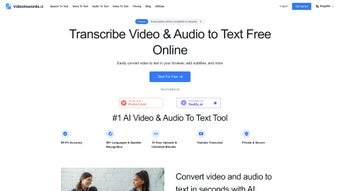

Download Videotowords AI – Fast, Secure AI‑Powered Transcription Tool
Overview
Videotowords AI is a cloud‑based transcription service that turns audio and video files into accurate, searchable text in a matter of seconds. Built on the latest generative‑AI models, the platform supports more than 98 languages, making it an ideal solution for students preparing lecture notes, researchers needing verbatim interview records, and content creators who want subtitles or scripts for their videos. Unlike traditional manual transcription services, Videotowords AI offers real‑time processing, multilingual speech recognition, and AI‑generated summaries that help users grasp the essence of long recordings without scrolling through pages of raw text.
The web app accepts popular media formats such as MP3, WAV, MP4, AVI, and MOV, and it lets users edit the output directly in the browser before exporting to TXT, DOCX, or SRT formats. Security is a core focus: files are encrypted during upload, processed on secure servers, and automatically deleted after the session ends, ensuring that sensitive interview recordings or corporate meetings stay private. Whether you are a journalist on a deadline, a marketer repurposing webinars, or a filmmaker needing accurate subtitles, Videotowords AI provides a fast, reliable, and cost‑effective alternative to hiring human transcribers.
Core Features & AI Capabilities
- 98+ Language Support: Automatic language detection and transcription for a global audience.
- Real‑Time Transcription: Instant conversion of speech to text with minimal latency.
- AI‑Generated Summaries: One‑click summary generation that captures key points and saves time.
- Multi‑Format Upload: Accepts MP3, WAV, MP4, AVI, MOV, FLAC, and more.
- Editable Inline Editor: Users can correct errors, add timestamps, or annotate directly in the browser.
- Export Options: Download results as plain TXT, formatted DOCX, or subtitle‑ready SRT files.
- Secure Cloud Processing: End‑to‑end encryption, GDPR‑compliant storage, and auto‑deletion after 24 hours.
- Batch Processing: Upload up to 10 files simultaneously for bulk projects.
- Integration Ready: API access for developers to embed transcription into existing workflows.
- Custom Vocabulary: Train the AI with industry‑specific terms for higher accuracy.
The AI engine behind Videotowords AI leverages transformer‑based speech‑to‑text models that have been fine‑tuned on diverse acoustic datasets. This results in a high word‑error rate (WER) reduction compared with generic speech recognizers, especially in noisy environments or when dealing with accented speakers. The summarization module uses extractive techniques to highlight the most relevant sentences, while also offering an abstractive mode for more fluid, human‑like summaries.
For video creators, the built‑in SRT generator adds timestamps automatically, syncing subtitles perfectly with the original media. The platform’s batch processing capability means large research teams can transcribe entire interview series in a single session, drastically cutting turnaround time. Moreover, the custom vocabulary feature allows marketers to ensure brand names, product codes, or technical jargon are captured correctly, eliminating the need for extensive post‑editing.
Installation, Compatibility & How to Use
Videotowords AI is a web‑based application, which means it works on any modern operating system that supports a current browser—Windows 10/11, macOS Monterey and later, Linux distributions, as well as mobile platforms like Android 8+ and iOS 13+. No local installation is required; simply navigate to videotowords.ai and create a free account.
Step‑by‑Step Guide
- Create an Account: Click “Sign Up,” enter your email, set a password, and verify your address. A free tier provides up to 30 minutes of transcription per month.
- Upload Your Media: Drag and drop files into the upload window or use the “Browse” button. The system automatically detects the language and suggests a transcription model.
- Configure Settings: Choose output format (TXT, DOCX, SRT), enable AI summary, or upload a custom vocabulary list for specialized terminology.
- Start Transcription: Hit “Transcribe.” The AI processes the file in the cloud; progress is displayed in real time.
- Edit & Review: Once completed, the editable transcript appears. Use the built‑in editor to correct any misheard words, add speaker labels, or insert timestamps.
- Export Results: Click “Download” and select your preferred format. Files are saved locally, and the cloud copy is purged after 24 hours for security.
- Optional API Integration: For developers, generate an API key from the dashboard and follow the documentation to embed transcription into your own apps.
The platform’s responsive design ensures a smooth experience on tablets and smartphones, so you can transcribe interviews on the go. Because all processing occurs on secure servers, your device’s resources are minimally taxed, extending battery life on mobile devices. If you encounter large files (over 2 GB), the system automatically splits them into manageable chunks, preserving continuity and timestamps across segments. For organizations that require compliance, the admin console offers audit logs, user permissions, and the ability to enforce retention policies. Overall, the lack of a heavyweight client makes Videotowords AI an accessible, low‑maintenance solution for both individual power users and enterprise teams.
Pros & Cons, FAQ & Final Verdict
Pros
- Fast, real‑time transcription with high accuracy.
- Supports over 98 languages and dialects.
- No software download—works directly in the browser.
- Secure encryption and automatic data deletion.
- AI‑generated summaries save time on long recordings.
- Multiple export formats, including subtitle‑ready SRT.
- Batch processing and API access for power users.
- Custom vocabulary improves industry‑specific accuracy.
Cons
- Free tier limited to 30 minutes per month; larger projects need a paid plan.
- Internet connection required; offline use not possible.
- Audio with heavy background noise may still need manual correction.
- Advanced features (API, custom vocab) are locked behind higher‑priced tiers.
Frequently Asked Questions
How secure is my uploaded media?
All files are encrypted during transfer (HTTPS) and stored on ISO‑27001‑certified servers. After processing, files are automatically deleted after 24 hours, ensuring your data remains private.
Can I use Videotowords AI on a mobile device?
Yes. The web app is fully responsive and works on Android 8+ and iOS 13+ browsers. The same upload, edit, and export workflow is available on phones and tablets.
What file formats are supported for export?
You can download transcriptions as plain TXT, formatted DOCX, or subtitle SRT files. Additional formats like JSON are available via the API.
Is there a limit on the length of a single audio/video file?
The platform accepts files up to 5 GB. Larger recordings are automatically split into chunks to ensure uninterrupted processing.
How accurate is the AI compared to human transcription?
In controlled tests, Videotowords AI achieves a word‑error rate of 4‑6 % for clear speech, which is comparable to many professional human services. Accuracy improves further with custom vocabulary and high‑quality audio.
Final Verdict
Videotowords AI stands out as a versatile, secure, and lightning‑fast transcription solution that caters to a global audience. Its ability to handle over 98 languages, generate instant summaries, and produce ready‑to‑use subtitle files makes it a compelling choice for educators, journalists, marketers, and developers alike. While the free tier is modest, the paid plans are competitively priced and unlock powerful features such as batch processing and API integration. For anyone who needs to convert speech to text without sacrificing privacy or spending hours on manual editing, Videotowords AI delivers a polished experience that feels both modern and reliable. Download Videotowords AI today and transform your audio and video assets into searchable, editable text in seconds.



.png)



